Welcome to my humble online space! Some others have passed through before you. Feel free to stay a while and look around.
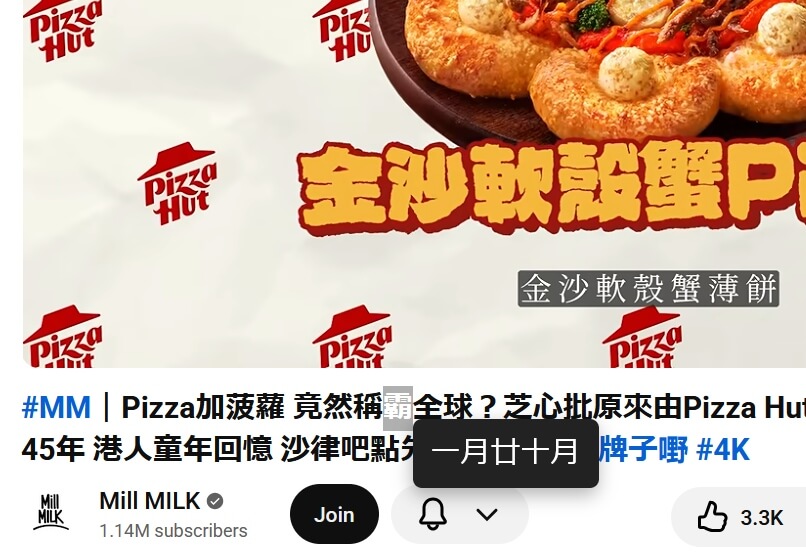
Created Firefox addon to look up Cangjie for Chinese text
Cangjie is an input method for typing Chinese based on how the character is written rather than how it is pronounced. It comes in handy when studying Chinese and encountering a new word that you can’t pronounce, since if you can guess how to decompose the character into the Cangjie components, you can type it and therefore look it up. Sometimes, it’s hard to guess how to decompose the character, so I made a Firefox addon to be able to right-click and look up the character’s Cangjie code. The addon grabs the selected text and looks up the code from a lookup table, then it displays the code in a popup on the page next to the cursor.
Created Kotoba-inspired Discord bot to render pinyin for Chinese text
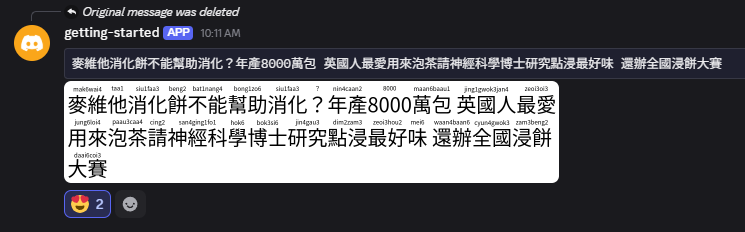
The Kotoba Discord bot has a useful command to take input Japanese text and render PNG images with furigana. Looking up furigana within Discord is convenient and has advantages like keeping a history of lookups, which is useful for review. Wouldn’t it be nice to do the same thing for Chinese? I repurposed the API supporting my pinyin lookup webapp and connected it with another API that reuses Kotoba’s furigana rendering library to overlay pinyin on Chinese text. I then hook up this API with a slash command provided by my Discord bot, which kicks off a job to render the image and post it back to the channel by webhook message. The bot and supporting backend all run serverless, and I learned a lot by building on AWS Lambda and Cloudflare Workers.
Figured out API Gateway streaming with Lambda
AWS Lambda is a good option to build backend APIs, is made pretty accessible with SAM, and with Lambda Web Adapter acting as a reverse proxy to your app server, you can just write in your framework of choice knowing that it will just work on Lambda without worrying about the details. However, the devil is in the details as you’d have to jump through hoops with Lambda Function URLs if you want to make use of response streaming e.g. for serving LLM tokens. As of November 2025, API Gateway supports response streaming and solves this issue, but while there are a number of configuration methods, setting this up with SAM was a bit of a mystery. To clear things up, I put together a starter SAM project that demonstrates a minimal template to set up a REST API with streaming endpoint handled by FastAPI. The project is a good starting point for building backend APIs. Here’s a link to the Github repository.